|
|
可直接使用的优化版脚本(Avatar.cmd)双击即用 / 命令行调用
- @echo off
- chcp 65001 >nul
- title 头像生成工具 — 微软.accountpicture-ms 无损生成/提取
- mode con: cols=70 lines=25
- :: 检查是否为提取/生成模式
- if "%~1"=="" goto show_help
- if /i "%~1"=="extract" goto extract_avatar
- if /i "%~1"=="x" goto extract_avatar
- :generate_avatar
- :: 生成模式:Avatar.bat 图片.png 输出.accountpicture-ms
- if not exist "%~1" (
- echo 错误:未找到图片文件!
- pause >nul
- exit
- )
- if "%~2"=="" (
- echo 用法:Avatar.bat 图片文件 输出文件名.accountpicture-ms
- pause >nul
- exit
- )
- echo 正在生成微软标准头像文件...
- echo 输入:%~1
- echo 输出:%~2
- :: 核心:图片转换 + 微软.accountpicture-ms 封装
- powershell -Command "Add-Type -AssemblyName System.Drawing; \
- $img = [System.Drawing.Image]::FromFile('%~1'); \
- $stream = New-Object System.IO.MemoryStream; \
- $img.Save($stream, [System.Drawing.Imaging.ImageFormat]::Jpeg); \
- $bytes = $stream.ToArray(); \
- $header = [byte[]]@(0x8E,0x02,0x01,0x00,0x8A,0x02,0x01,0x00,0x31,0x53,0x50,0x53,0x18,0xB0,0x8B,0x0B,0x25,0x27,0x44,0x4B,0x92,0xBA,0x79,0x33,0xAE,0xB2,0xDD,0xE7); \
- $block1 = [byte[]]@(0x4D,0x11,0x00,0x00,0x04,0x00,0x00,0x00); \
- $file = [System.IO.File]::Create('%~2'); \
- $file.Write($header, 0, $header.Length); \
- $file.Write($block1, 0, $block1.Length); \
- $file.Write($bytes, 0, $bytes.Length); \
- $file.Close(); \
- $img.Dispose();"
- echo 生成完成!
- echo 命令行快速应用:start explorer.exe "%~2"
- goto end
- :extract_avatar
- :: 提取模式:Avatar.bat extract xxx.accountpicture-ms
- if not exist "%~2" (
- echo 用法:Avatar.bat extract 头像.accountpicture-ms
- pause >nul
- exit
- )
- echo 正在提取内部图片...
- powershell -Command "$data = [System.IO.File]::ReadAllBytes('%~2'); \
- $jpegStart = 44; \
- $fs = [System.IO.File]::Create('提取的头像.jpg'); \
- $fs.Write($data, $jpegStart, $data.Length - $jpegStart); \
- $fs.Close();"
- echo 提取完成:提取的头像.jpg
- goto end
- :show_help
- echo.
- echo 头像生成工具 — By 优化版
- echo ==============================================
- echo 支持格式:JPG PNG BMP GIF ICO HEIC AVIF 等14+种
- echo 生成微软账户头像:.accountpicture-ms
- echo ==============================================
- echo 【生成命令】
- echo Avatar.bat 图片文件 输出.accountpicture-ms
- echo.
- echo 【提取命令】
- echo Avatar.bat extract 头像.accountpicture-ms
- echo.
- echo 【一键应用】
- echo start explorer.exe "xxx.accountpicture-ms"
- echo ==============================================
- echo.
- :end
- pause >nul
超简命令行版(静默无窗口,适合批量部署)
- @echo off
- chcp 65001 >nul
- :: 静默生成头像(无任何窗口)
- powershell -Command "Add-Type -AssemblyName System.Drawing; \
- $img=[System.Drawing.Image]::FromFile('%~1'); \
- $ms=New-Object System.IO.MemoryStream; \
- $img.Save($ms,[System.Drawing.Imaging.ImageFormat]::Jpeg); \
- $header=[byte[]]@(142,2,1,0,138,2,1,0,49,83,80,83,24,176,139,11,37,39,68,75,146,186,121,51,174,178,221,231); \
- $block=[byte[]]@(77,17,0,0,4,0,0,0); \
- $fs=[System.IO.File]::Create('%~2'); \
- $fs.Write($header,0,$header.Length); \
- $fs.Write($block,0,$block.Length); \
- $fs.Write($ms.ToArray(),0,$ms.Length); \
- $fs.Close(); $img.Dispose();" >nul 2>nul
|
|

 闽公网安备35020302032614号 )


 IP卡
IP卡 狗仔卡
狗仔卡 发表于
发表于 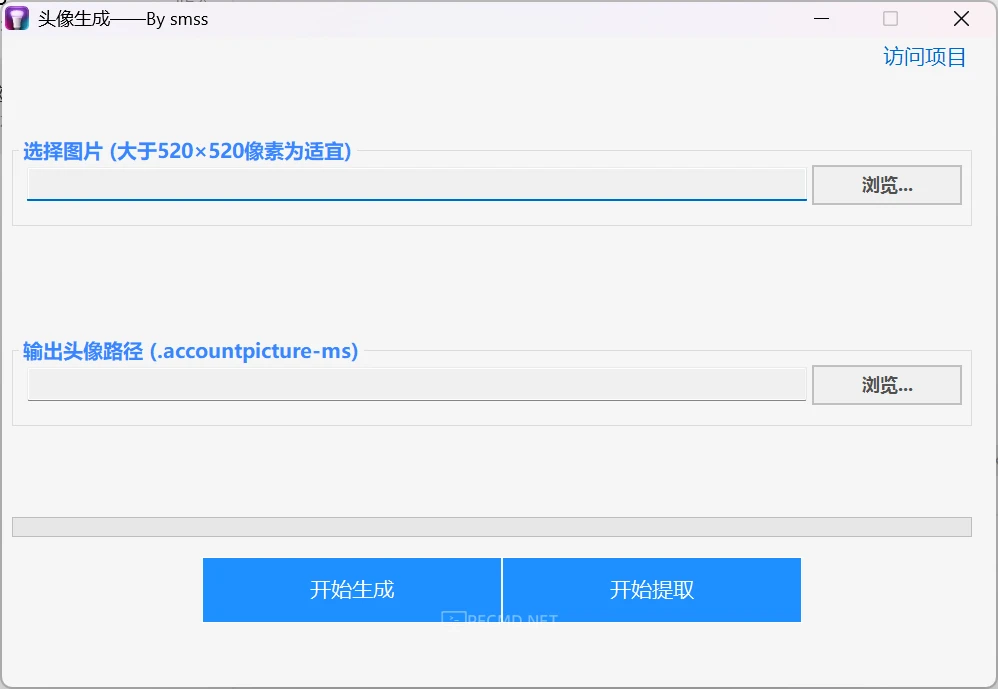
 提升卡
提升卡 沉默卡
沉默卡 喧嚣卡
喧嚣卡 变色卡
变色卡 千斤顶
千斤顶 显身卡
显身卡