|
|
本帖最后由 yfd11 于 2026-4-11 08:58 编辑
新建CNC数控机床文件 请运行以下批处理 下载后自已改后缀为.7z 或直接右键用7Z打开,运行时用右键管理员运行。怕麻烦直接合并成1个文件。
 右键新建CNC文件.7z.svg
(2.14 KB, 下载次数: 11)
右键新建CNC文件.7z.svg
(2.14 KB, 下载次数: 11)
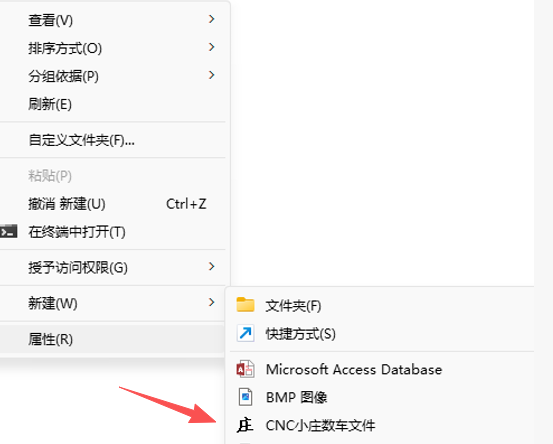
运行后右键增加上图,如不喜欢图标可以自行更改
- ::新建模板文件
- @echo off
- @chcp 936 >nul
- @echo ^.LOG>"%~dp0cncnew.dat"
- @echo.>>"%~dp0cncnew.dat"
- @echo ^@echo 弱智制作QQ:yfdzjy@163.com >>"%~dp0cncnew.dat"
- ::新建注册文件
- reg add HKCR\.CNC\ShellNew /v FileName /d "%~dp0cncnew.dat" /f
- reg add HKCR\.CNC/ve /d CNCfile /f
- reg add HKCR\CNCfile\shell /ve /d open /f
- reg add HKCR\CNCfile\shell\open\command /ve /t REG_SZ /d "%SystemRoot%\system32\notepad.exe ""%%1""" /f
- reg add HKCR\CNCfile\DefaultIcon /ve /t REG_EXPAND_SZ /d "%~dp0庄.ico" /f
- ::重新注册CNC与关连打开软件notepoad
- assoc .CNC=CNCfile
- ftype CNCfile=C:\Windows\system32\notepad.exe "%%1"
- ::重启桌面
- cmd.exe /c taskkill /f /im explorer.exe && start explorer.exe
- ::退出
- pause>nul|echo 按任意键退出
|
|

 闽公网安备35020302032614号 )

 IP卡
IP卡 狗仔卡
狗仔卡 发表于 2026-4-10 10:20:40
 提升卡
提升卡 沉默卡
沉默卡 喧嚣卡
喧嚣卡 变色卡
变色卡 千斤顶
千斤顶 显身卡
显身卡