|
|
本帖最后由 yyz219195888 于 2026-4-27 11:33 编辑
完美解决了:
去掉原文中下面两行:
text-decoration: underline !important;
font-weight: bold !important;
==========================================
原来的问题:
现在,点过的链接,会变蓝色和下划线(好像还加粗),如图所示:
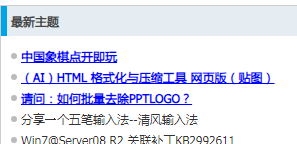
我不希望有“划线 和 加粗 ”,仅变蓝色就可以。
麻烦帮我修改一下,谢谢
=========================
content.js:
// 配置默认颜色
const DEFAULT_COLOR = '#0000FF'; // 蓝色
// 获取存储中的已访问链接集合
async function getVisitedLinks() {
return new Promise((resolve) => {
chrome.storage.local.get(['visitedLinks'], (result) => {
resolve(new Set(result.visitedLinks || []));
});
});
}
// 保存已访问链接
async function saveVisitedLink(url) {
const visited = await getVisitedLinks();
if (!visited.has(url)) {
visited.add(url);
chrome.storage.local.set({ visitedLinks: Array.from(visited) });
}
}
// 标准化URL,去除哈希和查询参数以提高匹配率(可选策略,这里保留完整href以确保精确)
function normalizeUrl(url) {
try {
return new URL(url, window.location.href).href;
} catch (e) {
return url;
}
}
// 应用样式到已访问链接
function applyStyles(visitedSet) {
const links = document.querySelectorAll('a[href]');
links.forEach(link => {
const href = link.getAttribute('href');
if (!href || href.startsWith('#') || href.startsWith('javascript:')) return;
const fullUrl = normalizeUrl(href);
if (visitedSet.has(fullUrl)) {
link.classList.add('vlh-visited');
}
});
}
// 初始化
async function init() {
// 1. 注入CSS样式
const style = document.createElement('style');
style.id = 'vlh-styles';
style.textContent = `
.vlh-visited {
color: ${DEFAULT_COLOR} !important;
text-decoration: underline !important;
font-weight: bold !important;
transition: color 0.3s ease;
}
.vlh-visited:hover {
color: #ff00ff !important; /* 悬停时更亮 */
}
`;
document.head.appendChild(style);
// 2. 获取已访问记录并应用
const visited = await getVisitedLinks();
applyStyles(visited);
// 3. 监听点击事件,记录新访问的链接
document.addEventListener('click', async (e) => {
const target = e.target.closest('a[href]');
if (target) {
const href = target.getAttribute('href');
if (href && !href.startsWith('#') && !href.startsWith('javascript:')) {
const fullUrl = normalizeUrl(href);
await saveVisitedLink(fullUrl);
// 立即应用样式,无需刷新
target.classList.add('vlh-visited');
}
}
}, true);
}
// 等待DOM加载完成后执行
if (document.readyState === 'loading') {
document.addEventListener('DOMContentLoaded', init);
} else {
init();
}
================================
|
评分
-
查看全部评分
|

 闽公网安备35020302032614号 )

 IP卡
IP卡 狗仔卡
狗仔卡 发表于 2026-4-27 11:04:15

 提升卡
提升卡 沉默卡
沉默卡 喧嚣卡
喧嚣卡 变色卡
变色卡 千斤顶
千斤顶 显身卡
显身卡